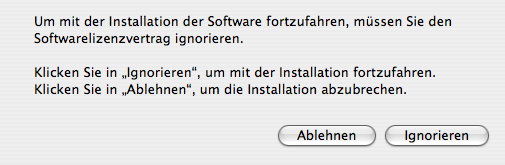
Ignore
165 words
Everyone who ever used Microsoft software and particularly the 'assistants' included in it has probably wondered how they manage to put all the wrong options there: They'll give you four elaborately explained, yet unintelligible options, where a concise choice of 'Cancel', 'Fuck off and die' and 'Go to hell and never bother me again' would be more than sufficient. Of course Microsoft has a lot of experience in this kind of game – seeing that even innocent bystanders as myself are aware of the (A)bort, (R)etry, (I)gnore, (C)ancel?
glory that DOS offered.
Owing to the omnipresence of 'licenses' these days, everybody else is bothered with similarly inappropriate dialogue boxes these days whenever they install software. Invariably those dialog boxes lack the Ignore
button – a step back even from the days of MSDOS. Thankfully this can be improved in OSX owing to its superior localisation techniques.
A few obvious edits to the file Localizable.strings in the folder /Applications/Utilities/Installer.app/Contents/Resources/Documents.bundle/Contents/Resources/yourlanguage.lproj and your system gives you the reasonable option.