X.4 Tidbits 2
1015 words on X.4 Overview
More notes on X.4:
-
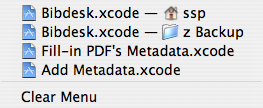 The recent documents menu has been improved to not just include the names but also the icons of the recent documents and the folders they’re contained in if you’ve recently opened two documents with the same name from different folders. I think this makes it easier to spot the difference and enables you to find things with less effort.
- Dragging an icon from the Dock will now turn the cursor into a ‘poof’ cursor to indicate that you’re removing the icon from the Dock even when it might stay there after releasing the mouse button because the application is still running. Probably still a bit confusing – but better than before with no indication at all.
-
The Enery Saver looks simpler now and gives a clearer distinction between the different energy profiles.
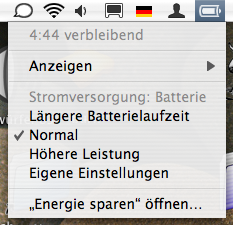 What puzzles me is that there’s only a single entity of ‘My Settings’ and that making any change to one of the presets will overwrite whatever other custom setting I had made before. What also puzzles me is that there’s a menu for setting the processor speed but it’s always in the ‘High’ setting – even in the most energy saving mode. Another nice improvement is that you can easily switch between the profiles now if you’re using the Battery menu. The data it shows seem to be less reliable than they used to be, though. The times tend to be significantly too high and I had the computer fall asleep without giving me the warning window beforehand.
-
Permissions have always been a great pain in OS X. At the same time they are essential for keeping the system reasonably secure. Certain pieces of software shouldn’t be executed by the system if they aren’t owned by a reasonably privileged user and write access to them isn’t limited. Unfortunately certain third party installers don’t get this right. It looks like X.4 now checks the permissions for certain folders automatically and offers to correct problematic settings.
Apart from this being a good idea, I thought the UI was quite good as well as it clearly gives you an option to ‘decide later’. Nasty things like access rights tend to cross your way when you’re in a hurry to get something done and can’t spend time finding out what you have to do. Getting a dialogue that gives you the typical ‘Correct/Cancel’ options will leave you feeling uneasy as it’s not clear that you’ll get another opportunity to look into this. Having ‘Decide later’ instead is much better.

The problems I had were eventually fixed. But I think it took two attempts. I had installed a few pieces of third party software, though, without doing the recommended restarts.
- The delay of the volume and brightness bezels coming up is even larger now than it used to be.
-
Safari has much better error messages now as they don’t spawn a sheet that blocks all of the window’s tabs and will require user interaction to get rid of but just display in the browser’s content area. Not hat Camino hasn’t done this for ages. The extra display area Safari has this way can be used well to offer additional explanations which might make a standard sheet look cluttered. Apple even offer helpful buttons in some cases, including one that opens a new tool to check your network connection:

-
That tool, Network Diagnostics, which lives in the System folder’s CoreServices folder, can probably be quite helpful for people who feel ‘lost’ with all the different settings and buttons in the Network preference pane. And with being triggered by buttons that you seen whenever there is a network problem it may be a useful tool. I haven’t tested it exhaustively but it couldn’t connect to our wireless network using the password from my keychain.

- While at the topic of wireless networking, let me note that my Powerbook fails to automatically reconnect to our wireless network when waking from sleep. Are you seeing similar problems or can you recommend some preference file to delete to fix this?
-
But back to Safari. It also has a fun warning to stop you from stepping into spoofed URLs using IDNs. I ran into that when playing around with PithHelmet the other day. Good to have a ‘More Info’ button there as well, which just leads to some web page, though. The dialogue isn’t localised either.

-
People who’ve used OS X for a while will know that one of the good things about its so-called Finder is that you’re pretty sure it won’t get much worse in future versions. But Apple seem to disagree and work hard to introduce more non-standard UI and bugs into the product. What exactly did they think when coming up with the sheet for saving ‘smart’ folders which will only let you save them in three different locations – despite those ‘folders’ just being simple files which will happily live anywhere on your hard drive?

- There are a few new Desktop Backgrounds, a couple of them being nice black and white affairs.
-
This may not be all new but it’s the first time I’ve seen it because I hadn’t started from a freshly installed system for ages: There is no Classic preference pane in the System Preferences by default. It will just be placed there after you’ve used Classic once.

As I started the X.4 experience on a new hard drive and did a clean install, I also had to reinstall a couple of other things. I was pleased to see that Wacom have managed to have a proper preference pane for their tablet driver now. And – like everyone else – I had to wait until a week ago before Cisco had managed to upgrade their wonderful VPN client to work with X.4. The current version seems to have a slightly different icon and it seems to be a bit less reliable than its predecessor. In particular it sometimes just stops working and starts giving confusing error messages with hexadecimal numbers when trying to use it after waking the computer from sleep.
